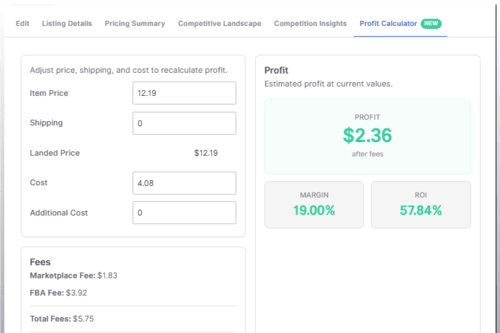
Open any Amazon listing, and you can now see exactly what you make on it. The new Profit Calculator is a tab inside the Listing Control Panel that shows your profit, margin, and ROI, and lets you change the price and cost to see how they move.
What you can do with it:
- See your profit in three ways: fixed profit, profit margin, and ROI.
- Update the cost or additional cost and save it straight to the listing.
- Adjust the item price or shipping to change the landed price, then save that as a manual price. You'll need to confirm before it goes live.
- Open the fee breakdown to see the referral fee rate and the other fees behind your profit.
- Selling in more than one currency? The calculator shows the exchange rate it used, so your profit reflects the conversion.
Where to find it:
- On your listings page, click a listing's profit to open the Profit Calculator tab.
- On a listing without a cost, that column shows Set Cost instead. Click it to open the calculator with the cost field ready to edit.
- You can also open any listing and select the Profit Calculator tab directly.
The Profit Calculator is available for Amazon listings.